
How to put the pool tournament bracket on the bar TV
The board on the wall is the single biggest upgrade a bar tournament can make. Players stop asking who they play, walk-ins can see how to join, and the organizer gets their night back. Here is how to do it with whatever TV the bar already has.
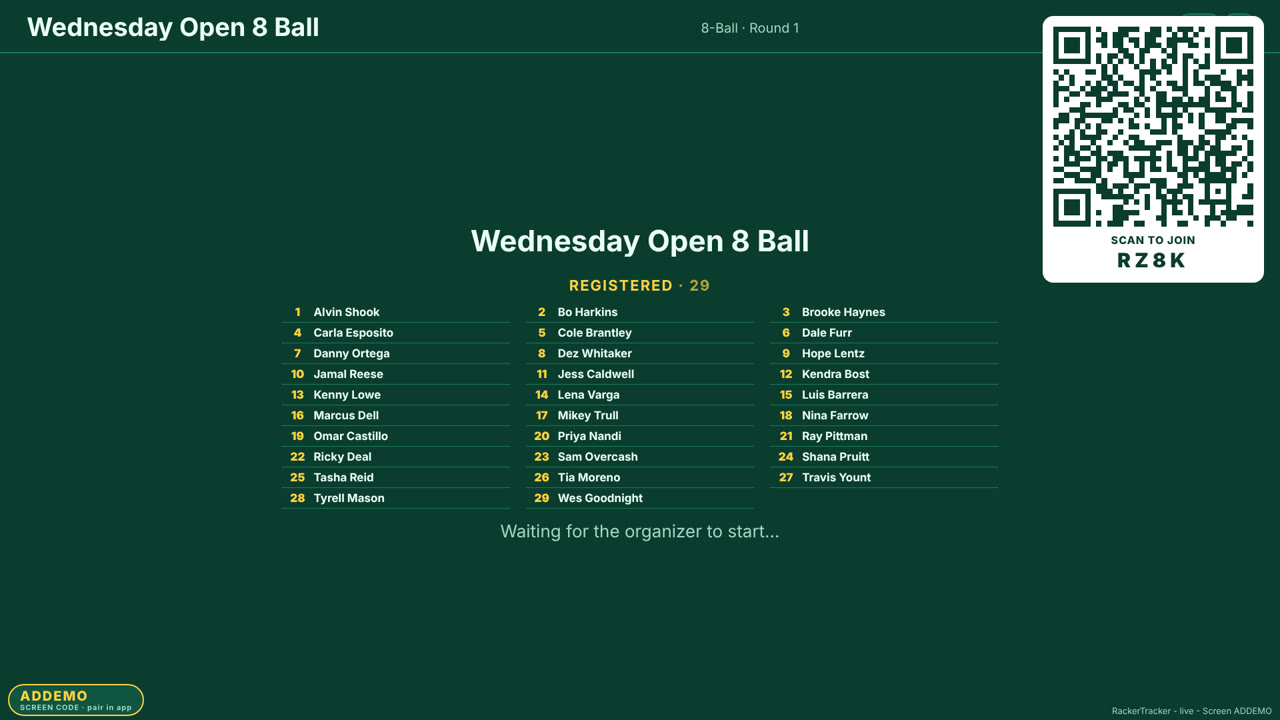
What the board shows
A tournament TV board has two modes. Before the start it is the sign-up sheet: the tournament name, the list of registered players as they scan in, and a big QR code with the join code under it. Once play begins it becomes the live board: which match is on which table, who is on deck for the next open table, the bracket or the lives standings, and - for a public event - the payouts. It updates itself as results come in from players' phones, so nobody has to walk over and change anything.
Option 1: the RackerTracker TV channel (Roku, Fire TV, Google TV)
If the bar's TV has a Roku, an Amazon Fire Stick or runs Google TV / Android TV, install the free RackerTracker TV app from that platform's store. It shows a four-letter pair code. In the phone app, open your tournament, choose Show on a TV, and type the code; the TV locks onto that tournament and follows it for the night. The TV keeps its pair code, so next week it is the same four letters - you point it at the new tournament from your phone in one step.
This is the option to pick when the bar will run tournaments regularly: no cables, no laptop, nothing to leave plugged in, and the bar staff can switch the TV back to the game with the remote.
- Roku: search the Channel Store for RackerTracker TV.
- Fire TV / Fire Stick: search the Amazon Appstore from the TV, or send it to the device from the Amazon website.
- Google TV / Android TV / Chromecast with Google TV: search Google Play on the TV. (Note: this is a TV app; it will not install on a phone from the Play listing.)
Step-by-step with screenshots: TV setup.
Option 2: cast from your phone (Chromecast)
For a classic Chromecast or any Google Cast target, open the tournament in the phone app and tap Cast. The TV shows the live board without the TV app installed. The board runs on the Chromecast itself, so you can put your phone in your pocket - it is not screen mirroring, and it does not drain your battery or show your notifications to the bar.
Option 3: any TV with a browser (or a laptop and an HDMI cable)
Every tournament has a board link that opens in any web browser. Smart TVs with a browser (most Samsung and LG sets), a Fire Stick's Silk browser, a laptop or a mini PC on HDMI all work. Open the link, hit full screen, and leave it. The page refreshes itself and will not sleep the display on most TVs. This is also the way to get the board onto a projector or an outdoor screen.
Option 4: streaming (OBS overlay)
If the bar streams its feature table, RackerTracker provides a scoreboard overlay URL you add to OBS as a browser source. It shows the two players, the race and the live score for one table and follows the match automatically. Themes and colours are organizer-selectable so it can match the bar's branding.
Making the board readable from the back of the room
- Mount height and size matter more than resolution: a 43-inch TV at eye level beats a 65-inch above the door.
- Turn off the TV's motion smoothing and "eco" dimming; the board is mostly static text and looks better without processing.
- If the room is bright, pick the high-contrast theme and bump the TV brightness; dark felt green on a dim TV disappears in daylight.
- Put the sign-up QR on the TV and on a table tent by the door; people scan what is in front of them. Our bar kit has print-ready posters and tents.
- Give the TV its own HDMI input and label it; "which input is the bracket on" wastes ten minutes every week.
Common problems
The board shows the wrong tournament. The TV is still paired to last week's event; re-enter the pair code from the new tournament, or pick the new one from the Show on a TV screen. The QR will not scan. The code is too small for the camera from across the room - most phones need the QR at least 10 cm across from 2 m away; the board sizes it generously, but a 32-inch TV across a big room is too far. Scan from the table tent instead. The TV went to sleep. Disable the screen-saver or auto-off timer on the TV, not in the app; the app already keeps the screen awake where the platform allows it. Scores are late. The board updates when players report; if a table is slow to report, the organizer can enter the score from their phone and the TV follows within a few seconds.
Run your next one with RackerTracker
Free for players. Organizers start with a free trial - no card needed.